
If you are weighing up Elementor Pro vs Free for your first WordPress website, you are not alone. Both versions let you design pages visually, but they give you different levels of customization and functionality.
If you are starting a blog, business website, portfolio, or online service, you might wonder whether the free version is enough or whether Elementor Pro is worth paying for.
I have been using Elementor for approximately four to five years, and during this time, I have gained practical experience with both the free and Pro versions. This long-term experience has helped me understand where the free version is sufficient and where the additional features of Pro become useful.
In this guide, I will compare Elementor Pro vs Free, explain the major differences, and help you decide which version is right for your website.
Quick answer: Elementor Free is a good starting point for beginners who want to build simple pages without paying for a page builder. Elementor Pro is a better option when you need greater design flexibility, custom website templates, advanced widgets, or built-in marketing features.
Elementor Pro vs Free: Quick Comparison
Before looking at the details, here is a quick comparison of Elementor Free and Elementor Pro.
| Feature | Elementor Free | Elementor Pro |
|---|---|---|
| Drag-and-drop editor | Yes | Yes |
| Basic page design | Yes | Yes |
| Responsive editing | Yes | Yes |
| Basic widgets | Yes | Yes |
| Advanced Pro widgets | No | Yes |
| Custom header and footer design | Limited by theme and available tools | Yes, through Theme Builder |
| Custom single post templates | Limited by theme and available tools | Yes |
| Custom archive templates | Limited by theme and available tools | Yes |
| Built-in advanced form features | Limited | Yes |
| Popup Builder | Not included | Available on eligible plans |
| WooCommerce design tools | Limited | Available on eligible plans |
| Custom CSS and advanced customization | Limited | Depends on the Pro plan |
| Cost | Free | Paid subscription |
Important: Elementor’s paid plans do not all include the same features. Before purchasing, check the current plan comparison to confirm that your chosen plan includes the tools you need.
My Experience with Elementor Free and Pro
I have been using Elementor for approximately four to five years. During this time, I have worked with both Elementor Free and Elementor Pro.
One thing I have learned is that the free version is not useless or merely a demo. It provides a practical way to build and customize WordPress pages without purchasing a page builder subscription.
For someone who is learning WordPress or building a simple website, Elementor Free can be a reasonable starting point.
However, my experience with Elementor Pro has shown me why the paid version can be valuable when a website needs more customization.
The main difference is not simply that Pro provides more widgets. It also gives you additional ways to control the design of different parts of a website.
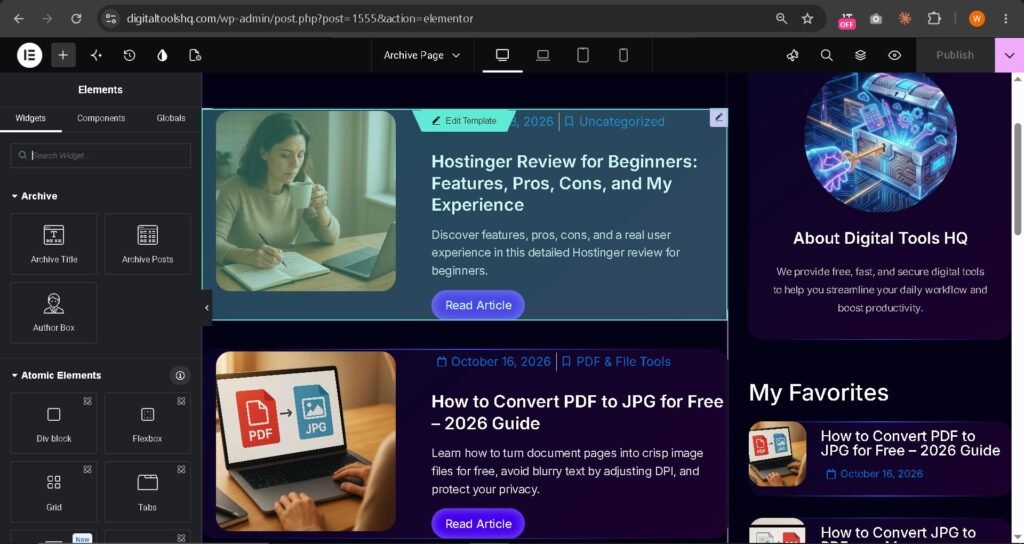
For example, when you want more control over your header, footer, individual blog post layout, or archive pages, Elementor Pro provides tools that are not available in the free version in the same way.
This can be especially useful for bloggers, business owners, and people who want to create websites for clients.
My recommendation: Do not purchase Elementor Pro just because you think every professional website requires it. First, identify the features you actually need. If the free version meets your requirements, you can continue using it. Upgrade when you need the additional capabilities.
1. What Is Elementor Free?
Elementor Free is the free version of the Elementor website builder for WordPress.
It allows you to create and edit website pages through a visual drag-and-drop interface. Instead of writing code for every design change, you can add elements, move them around, and adjust their appearance through the editor.
For beginners, this makes page design more accessible.
What Can You Do with Elementor Free?
With Elementor Free, you can:
-
Create custom page layouts.
-
Add headings, text, images, and buttons.
-
Build basic landing pages.
-
Arrange content into different sections and containers.
-
Adjust spacing, colors, and typography.
-
Create responsive layouts for different screen sizes.
-
Use basic design elements and available widgets.
-
Make changes visually without writing code for every adjustment.
You can use Elementor Free for a personal blog, a simple business website, a portfolio, or a basic landing page.
However, the exact design flexibility of your website also depends on your WordPress theme and any other plugins you use.
Advantages of Elementor Free
1. No page-builder subscription cost
The free version allows you to start designing without paying for Elementor Pro.
2. Beginner-friendly interface
The visual editor makes it easier to understand how page elements fit together.
3. Suitable for basic websites
You can create attractive pages with headings, images, buttons, and other essential elements.
4. Responsive design options
You can adjust layouts for desktop, tablet, and mobile devices.
5. A practical way to learn WordPress design
You can learn the Elementor interface before deciding whether you need paid features.
Limitations of Elementor Free
Although the free version is useful, you may encounter limitations when building a more customized website.
For example, you cannot use the complete Pro Theme Builder functionality to design your own header, footer, single post templates, and archive templates.
Some advanced widgets and marketing tools are also unavailable.
You may be able to achieve certain results with your theme or additional plugins, but this can mean learning another tool and managing more components.
For a simple website, these limitations might not matter. For a website that requires more control over its design, they can become important.
2. What Is Elementor Pro?
Elementor Pro is the paid version of Elementor that adds advanced website-building and customization features to the free plugin.

It is designed for users who need more control over their WordPress websites.
Elementor Pro includes the core Elementor editing experience along with additional widgets, templates, and tools. Depending on the plan, it can also provide features for lead generation, popups, custom code, and WooCommerce customization.
What Can You Do with Elementor Pro?
With an eligible Elementor Pro plan, you can:
-
Create custom headers and footers.
-
Design single blog post templates.
-
Customize archive and category page layouts.
-
Use additional widgets for more advanced designs.
-
Build forms for collecting visitor information.
-
Create popups where the selected plan includes this feature.
-
Customize certain WooCommerce pages using eligible plans.
-
Use additional design and customization options.
-
Create more consistent layouts across your website.
These features can be valuable when you want your website to have a consistent design rather than relying entirely on the options provided by your theme.
Advantages of Elementor Pro
1. More design flexibility
Pro gives you additional tools to customize different parts of your website.
2. Theme Builder
This is one of the most important differences between the free and Pro versions. You can use the Theme Builder to design supported theme parts, including headers, footers, and post templates.
3. Additional widgets
Pro offers widgets for layouts and functionality that are not included in the free version.
4. Built-in form functionality
The Form widget can help you collect information from visitors without needing a separate form builder for every use case.
5. More control over blog layouts
If you publish articles regularly, the ability to design single post and archive templates can help you maintain a consistent appearance across your website.
6. Useful for professional projects
If you create websites for businesses or clients, Pro may provide the additional design options you need.
Limitations of Elementor Pro
Elementor Pro is not the right choice for everyone.
-
It requires a paid subscription.
-
Some advanced features are available only on particular plans.
-
Learning the additional tools takes time.
-
Adding too many widgets, animations, or unnecessary design elements can make a website more complicated.
-
Buying Pro does not automatically make a website faster, more attractive, or better for SEO.
You should also remember that Elementor Pro does not replace WordPress hosting. You still need a suitable hosting service to run your website.
3. The Biggest Differences Between Elementor Pro and Free
Let’s look more closely at the differences that matter most to beginners.
Difference 1: Website Design and Customization
Both versions let you design pages visually.
With Elementor Free, you can build page layouts and customize many basic design elements.
Elementor Pro provides additional options for creating more complex layouts and controlling other parts of the website.
For example, imagine that you are building a business website.
You can use the free version to create a homepage with a heading, a description, images, and service sections.
However, if you also want to create a custom header, a branded footer, and a consistent layout for different types of pages, Pro may make the process easier.
Winner: Elementor Pro for advanced customization.
Difference 2: Header and Footer Builder
Your website’s header and footer are important parts of its design.
The header may contain your logo, navigation menu, and other essential elements. The footer may include contact information, useful links, and copyright details.
Elementor Free does not provide the complete Pro Theme Builder functionality for creating custom headers and footers.
Elementor Pro allows you to design these elements visually, subject to the capabilities of your selected plan.
This can be particularly helpful when the header and footer options in your WordPress theme are too limited for your needs.
Winner: Elementor Pro.
Difference 3: Single Post and Archive Templates
If you run a blog, this difference deserves special attention.
A single post template controls the layout of an individual blog post. An archive template controls the presentation of collections of posts, such as category or archive pages.
With Elementor Pro, you can use the Theme Builder to create supported templates for these parts of your website.
This helps you establish a consistent design across multiple articles without manually designing every post from scratch.
For example, you might want every article to display a featured image, title, author information, article content, and related elements in a particular layout.
Elementor Pro can provide more control over this process.
The free version can still be used for blogging, but the available template customization depends more heavily on your WordPress theme and other tools.
Winner: Elementor Pro for custom blog templates.
Difference 4: Widgets and Design Elements
Widgets are the building blocks you use to create pages in Elementor.
The free version includes basic widgets for common elements such as text, headings, images, and buttons.
Pro adds further widgets for more advanced designs and functionality.
Depending on your plan, these may include tools for displaying posts, creating forms, building navigation menus, displaying testimonials, or creating other interactive elements.
However, more widgets do not automatically mean a better website.
A clean website that uses only the necessary elements can be more effective than a complicated design filled with unnecessary features.
Winner: Elementor Pro for users who need additional widgets.
Difference 5: Forms and Lead Generation
Forms are useful when you want visitors to contact you, request a quotation, or submit their information.
Elementor Pro includes a Form widget that supports more advanced form-building workflows.
Depending on the features you need, this may reduce your reliance on a separate form plugin.
For example, a web design agency could use a contact form to collect a potential client’s name, email address, business website, and project requirements.
If you only need a basic contact form, a suitable free form plugin may be enough.
Winner: Elementor Pro for users who need its built-in form features.
Difference 6: Popups
Popups can be used to display announcements, promotional messages, or email signup forms.
Elementor’s Popup Builder is a paid feature, but its availability depends on the selected plan.
If you need popup functionality, confirm that it is included before purchasing.
If you do not need popups, this feature alone may not justify the cost of upgrading.
Winner: Elementor Pro on a plan that includes Popup Builder, if you need this functionality.
Difference 7: WooCommerce Customization
WooCommerce is a popular plugin for building online stores with WordPress.
Elementor Free can be used alongside WooCommerce, but it does not provide the complete set of advanced WooCommerce design tools available in eligible paid plans.
Elementor Pro plans that include WooCommerce Builder features can provide greater control over supported product, cart, checkout, and other store layouts.
This can be helpful if you want to customize the shopping experience rather than use the layouts provided by your theme.
If you are building a simple blog or a business website without an online store, you may not need these features.
Winner: Elementor Pro on an eligible plan for advanced WooCommerce customization.
4. Elementor Free vs Pro: Which Is Better for Beginners?
The answer depends on the type of website you want to build.
Choose Elementor Free If:
-
You are new to WordPress.
-
You are learning website design.
-
You want to keep your initial costs low.
-
You need a basic personal website.
-
You are creating a simple blog or landing page.
-
Your theme already provides the customization options you need.
-
You do not require Elementor Pro’s advanced widgets or templates.
For many beginners, starting with the free version is a sensible decision.
You can learn how Elementor works and discover which features you actually need before spending money.
Choose Elementor Pro If:
-
You need custom headers and footers.
-
You want greater control over single post and archive templates.
-
You need additional widgets for your website design.
-
You want to use Elementor’s built-in form features.
-
Your chosen plan includes other tools you need, such as Popup Builder or WooCommerce Builder.
-
You create websites professionally and need more design flexibility.
-
The time saved by using Pro features justifies the subscription cost.
For a professional website, Pro can be a useful investment when its features solve real problems.
However, you should compare the available plans carefully rather than assuming every paid plan includes every feature.
5. Is Elementor Pro Worth It?
In my opinion, Elementor Pro is worth considering if you need the advanced features it provides.
However, it is not automatically worth the cost for every website owner.
Imagine that you are building a simple blog. You want to publish helpful articles, add images, and organize your content into categories.
If your theme already provides a suitable header, footer, and article layout, Elementor Free may be sufficient.
Now imagine that you want to customize every part of your blog’s appearance, build reusable templates, and create a more consistent design across your website.
In that situation, Elementor Pro may be a better choice.
The decision should be based on your requirements, budget, and the amount of control you want over your website.
Consider the Total Cost
The price of Elementor Pro is only one part of your website-building budget.
You may also need to pay for:
-
WordPress hosting.
-
A domain name.
-
A premium theme, if required.
-
Other plugins or online services.
Before purchasing Pro, list the features you need and check whether the selected plan provides them.
You should also compare the annual subscription cost with the cost of any separate plugins you would otherwise use.
Do not assume that Pro will always be cheaper than using individual plugins. The answer depends on your requirements and the tools you already own.
6. Does Elementor Pro Improve Website Speed or SEO?
This is an important question because beginners sometimes assume that purchasing a premium page builder automatically improves search rankings.
That is not how SEO works.
Elementor Pro gives you additional design and functionality options, but buying it does not guarantee higher Google rankings.
Your SEO performance depends on several factors, including the quality and usefulness of your content, technical SEO, website structure, mobile usability, page experience, and competition for your target keywords.
Similarly, Elementor Pro does not automatically make your website faster.
Website speed can be affected by your hosting, theme, images, fonts, plugins, scripts, caching, and the complexity of your page layouts.
Whether you use Elementor Free or Pro, aim to build a clean website, optimize images, avoid unnecessary plugins, and test your pages on mobile devices.
My advice: Choose Elementor Pro for the functionality you need, not because you expect the paid version alone to improve your SEO rankings.
7. Can You Switch from Elementor Free to Pro Later?
Yes. You do not have to purchase Pro when you first start using Elementor.
You can begin with Elementor Free and upgrade later if you need additional features.
This is a practical approach for beginners who want to understand their requirements before committing to a paid subscription.
For example, you could start by building your homepage and essential pages with the free version.
As your website grows, you may decide that you need custom post templates, additional widgets, or other Pro features.
At that point, you can review the available plans and decide whether upgrading makes sense.
Before making changes to a live website, it is good practice to keep a backup and check compatibility with your current WordPress setup.
8. My Final Verdict: Elementor Pro vs Free
After approximately four to five years of using Elementor, my recommendation is to choose the version that matches your actual needs rather than automatically paying for the premium option.
Elementor Free is a useful starting point for beginners. It gives you a visual page builder and the essential tools to create many types of pages without purchasing Elementor Pro.
Elementor Pro is more suitable when you need additional design flexibility, custom theme templates, advanced widgets, or specific marketing and e-commerce features.
For a beginner building a simple website, I would recommend starting with Elementor Free if it provides everything you need.
For someone building a more customized blog, business website, or client website, Elementor Pro may be worth the investment.
There is no single answer that is right for everyone.
The best choice is the version that helps you build the website you need without paying for features you will not use.
If you are still unsure, start by listing the features you want on your website. Compare that list with Elementor’s current plan details before making your decision.
Frequently Asked Questions
1. Is Elementor Free good enough for beginners?
Yes. Elementor Free is suitable for many beginners who want to create basic pages, landing pages, personal websites, or simple business websites. Whether it is enough depends on your design requirements and the features provided by your WordPress theme.
2. What is the main difference between Elementor Pro and Free?
The main difference is the additional functionality available in Pro. This includes the Theme Builder, additional widgets, and advanced tools such as forms. Features such as Popup Builder and WooCommerce Builder depend on the selected paid plan.
3. Is Elementor Pro worth buying?
Elementor Pro can be worth buying if you need its advanced features and they save you time or provide functionality you cannot easily achieve with your existing setup. If you only need basic page design, the free version may be enough.
4. Can I build a complete website with Elementor Free?
Yes. You can build many types of websites using Elementor Free alongside WordPress and a suitable theme. However, certain advanced customization options may require a paid plan or additional tools.
5. Can I use Elementor Free for blogging?
Yes. You can use Elementor Free to design pages for a WordPress blog. Your theme will usually control important blog elements, and the available customization options will depend on your setup.
6. Is Elementor Pro necessary for a professional website?
No. A professional-looking website can be built without Elementor Pro. However, Pro can make certain advanced designs and website-wide customizations easier to implement.
7. Does Elementor Pro include hosting?
The standard Elementor Pro plugin subscription does not replace your WordPress hosting service. Check the details of any bundled or cloud-based product separately before purchasing.
8. Will my website stop working if my Elementor Pro subscription expires?
An expired subscription does not necessarily mean your website will immediately disappear. However, you may lose access to updates, support, and certain account benefits. Check Elementor’s current terms and consider the potential impact on your website before allowing a subscription to expire.
9. Does Elementor Pro improve SEO?
Not automatically. Pro provides additional design and functionality options, but search rankings depend on many factors, including content quality, technical SEO, usability, and competition.
10. Can I upgrade from Elementor Free to Pro without rebuilding my website?
In a typical setup, you can install and activate the Pro plugin alongside Elementor Free and continue working with your existing pages. Make a backup first and check compatibility before upgrading.
11. Is Elementor Free faster than Elementor Pro?
Neither version is guaranteed to be faster in every situation. Performance depends on how your website is built, which features you use, your hosting, and other optimization factors.
12. Which Elementor version should I choose in 2026?
Choose Elementor Free if you need basic page-building features and want to keep costs low. Choose a suitable Elementor Pro plan if you require advanced customization or other paid features. Always review the current official comparison before purchasing.
Ready to Choose the Right Elementor Version?
If you are starting a WordPress website, you can begin with Elementor Free and upgrade when your requirements grow.
If you already know that you need advanced templates, additional widgets, or other Pro features, compare the available plans before deciding.
You can review the current features and plans on Elementor’s official website.
Final recommendation: Start with what you need today, consider your future plans, and invest in additional features when they provide real value to your website.
Affiliate Disclosure
This article may contain affiliate links. If you purchase a product through a qualifying link, we may earn a commission at no additional cost to you. Our recommendations are intended to help readers make informed decisions. We encourage you to compare features, pricing, and alternatives before purchasing.